Fifteen years ago, few voices/voice artists knew how to edit in audio software. Today, that knowledge is largely essential for anyone involved in recording texts. As the prices for recording hardware (microphones, sound cards, computers, etc.) decrease and quality improves, the number of home studios also increases. Gone are the days when clients had to pay for expensive studios and sound engineers.
As audio editing software (Pro Tools, Logic, Cubase, Audacity, Sound Forge, etc.) improves, editing recordings also becomes faster and easier.
Cutting and pasting small, short audio files is relatively easy. You quickly find the section that needs editing and can easily correct the error.
The challenge arises with larger and longer audio material. If you are editing an e-learning course or an audiobook that is several hours long, you can expect it to take a significant amount of time. Finding and navigating large audio files is and has always been a challenge for producers, editors, and consumers alike.
 Therefore, here is a small tip that will significantly simplify your world..
Use a Clicker..
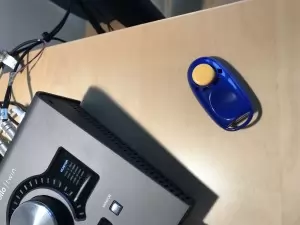
A clicker is a small device used for animal training (Read more about clickers here.) and can be purchased for ten kronor at your nearest pet store.
Next time you are recording a text, bring your clicker into the studio and press it every time you notice that you’ve misread something or recorded multiple versions of the same sentence.
When you then edit your recording, you will quickly find the sections that need to be polished or edited..
This is what it looks like when a clicker is used. Note the 2 vertical spikes that clearly show where an error occurred.